
AWS Verified Access Policy Assistant
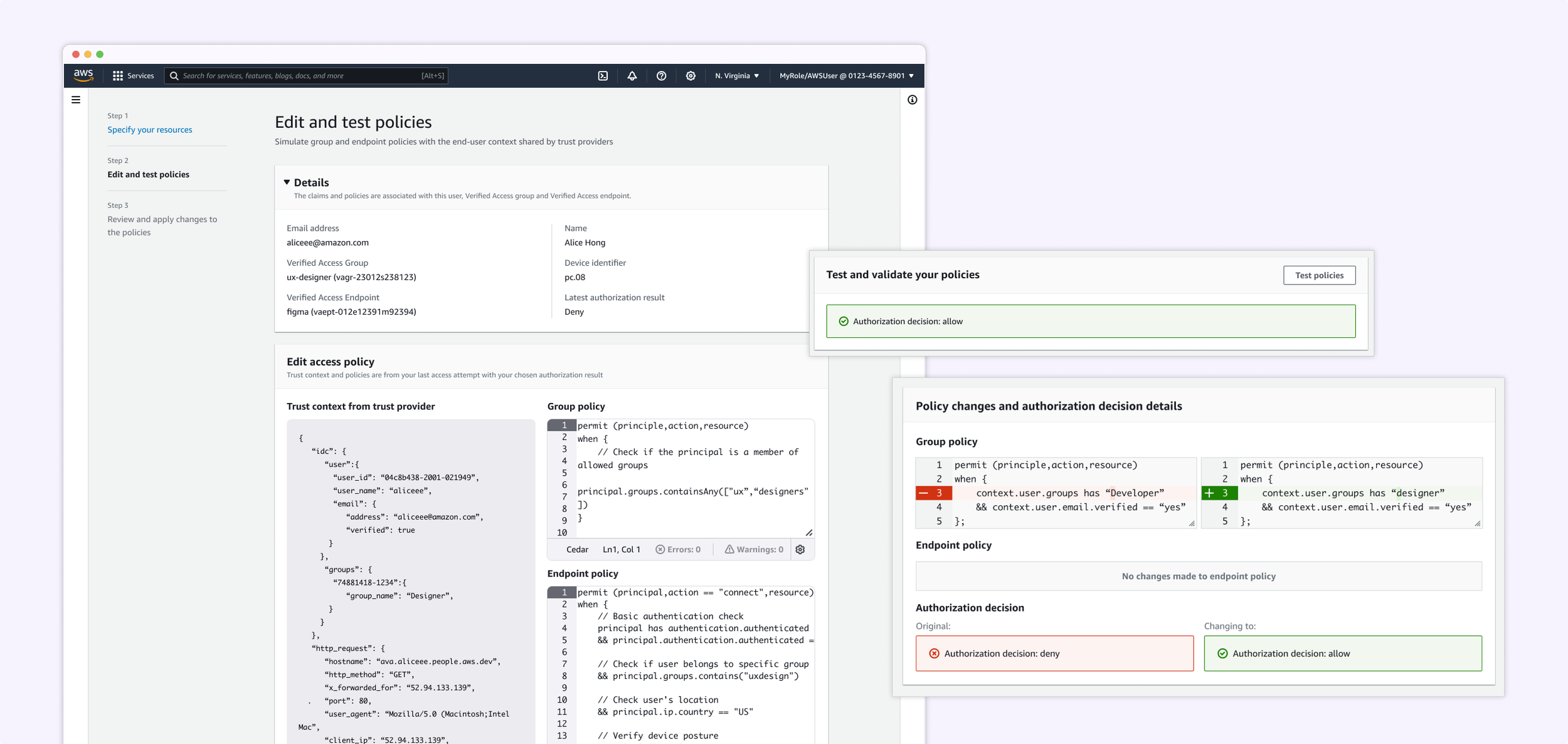
AWS console tool that helps IT admins write, test, and validate Cedar-based access policies using real identity and device context — reducing errors and improving confidence before deployment.
Role: Lead UX Designer
Responsibilities: As the lead UX designer, I collaborated closely with PMs and engineers to define the purpose and functionality of the Verified Access Policy Assistant. I partnered with the product manager and interviewed users to identify key friction points in writing Cedar-based policies. I then designed a unified interface where users could view, edit, and test policies in real time.
Duration: 6 months
Users & Audience: Mainly Security Engineers and IT Administrators
Problem
Admins had no way to test their Verified Access policies before saving them. Cedar policy logic—especially when combined with various trust providers—was difficult to visualize or validate, leading to broken access, failed deployments, and reliance on trial-and-error debugging.
Step 1 | Understand background
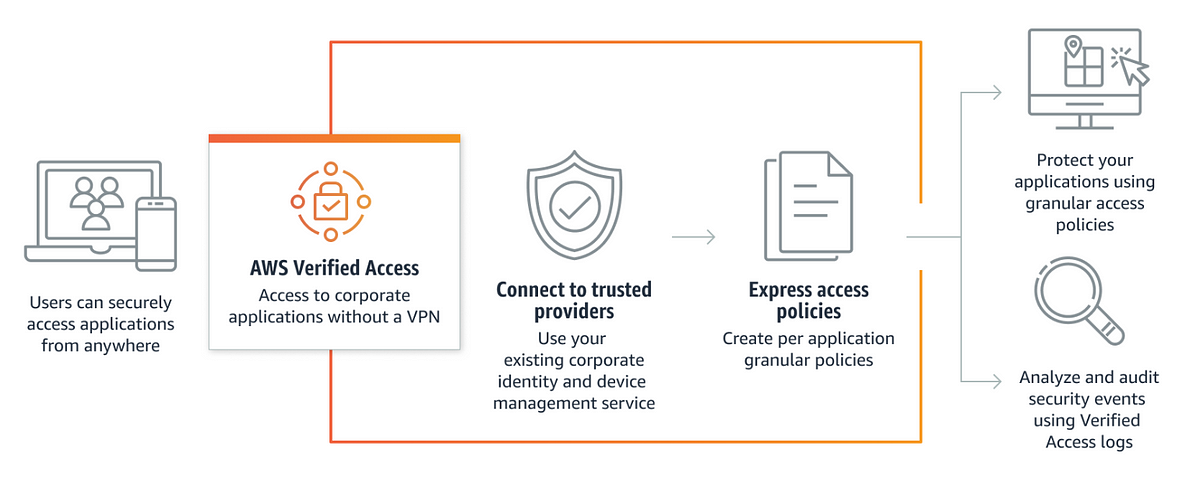
Since I had never worked with AWS Verified Access before, I first set out to understand what it was, who used it, and why. I learned that administrators write Cedar-based policies to grant access to specific applications. For example, an IT admin may want to give a group of UX designers access to Figma. This required understanding not just policy logic, but also the broader system: how identity providers, trust context, and APIs interact with the console experience.
Given the steep learning curve and short timeline, I scheduled deep-dive sessions with engineers and PMs who had worked on the service, read internal documentation and policy specs, and came prepared with targeted questions, especially around how backend constraints would influence the user experience.
Step 2 | Understand the user
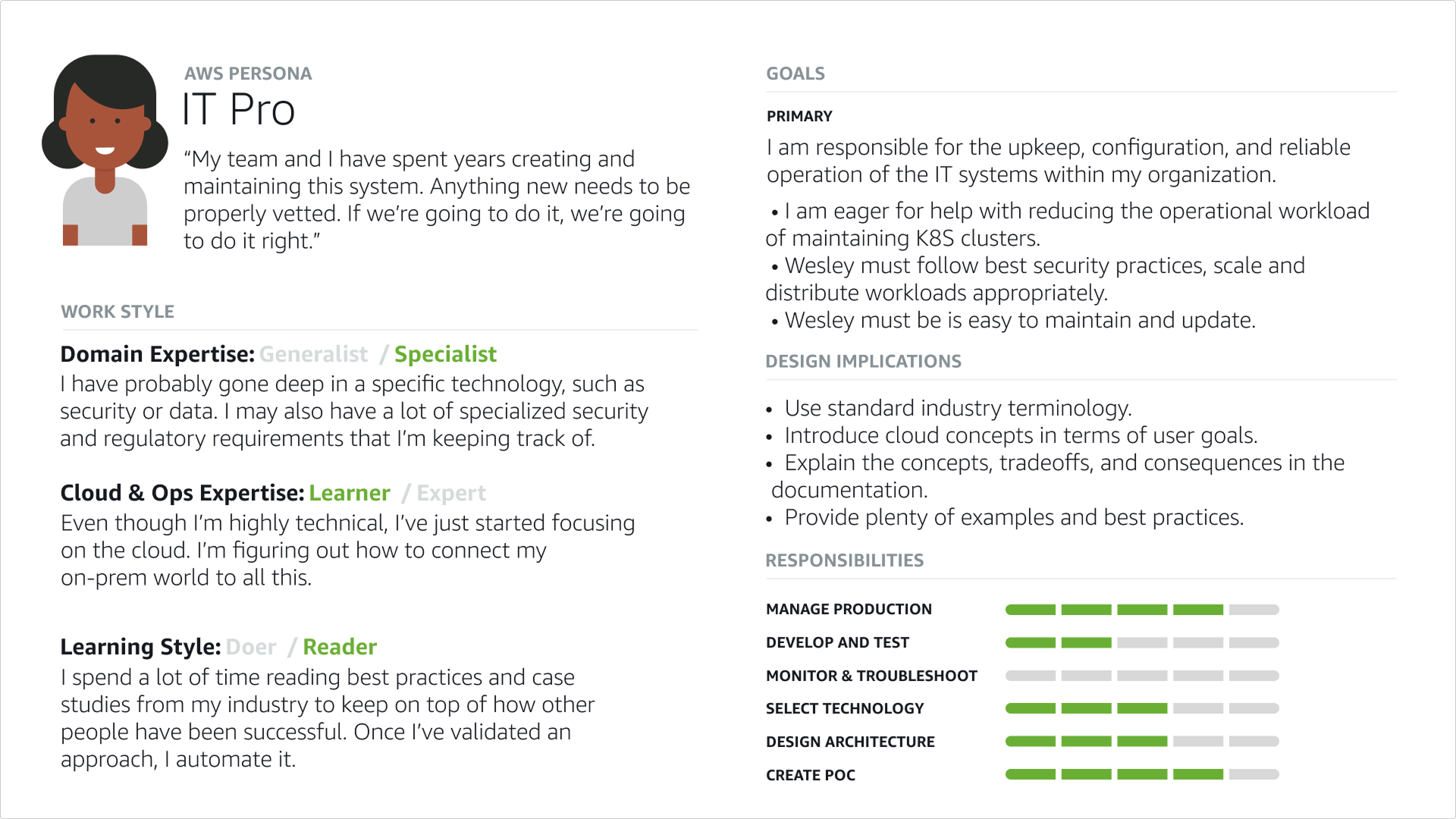
Due to the tight timeline, I unfortunately wasn’t able to conduct a full-fledged UX research study. Instead, I partnered closely with the product manager and joined customer calls to gather insights directly from users. On these calls, I asked targeted questions to understand how IT admins currently validated their Cedar policies and what pain points they encountered.
Through these conversations, I learned that users had no clear way to verify whether their policies would work before saving them. This led to frequent errors, manual workarounds, and time-consuming trial and error, especially when trust context varied across identity providers. Even experienced security engineers struggled to confidently author policies without seeing how the logic would behave in context. It became clear that users needed a way to view, test, and validate their policies in real time, with visibility into all inputs, before deploying them to production.
(Screenshot from presentation)
Step 3 | Design decisions
I held regular working sessions with engineers from both the Verified Access and Trust Provider teams to:
Understand backend logic and constraints
Ensure the feasibility of real-time policy validation
Advocate for greater transparency around how trust context is surfaced and evaluated
Once I had a clear understanding of technical limitations and the most pressing user needs, I began designing mockups focused on reducing cognitive load and increasing user confidence. I prioritized surfacing the three key inputs, group policy, endpoint policy, and trust context, in a single, testable interface. With one click, users could simulate a policy and instantly view its authorization decision (allow or deny).
Closer look:
Edit and test policies
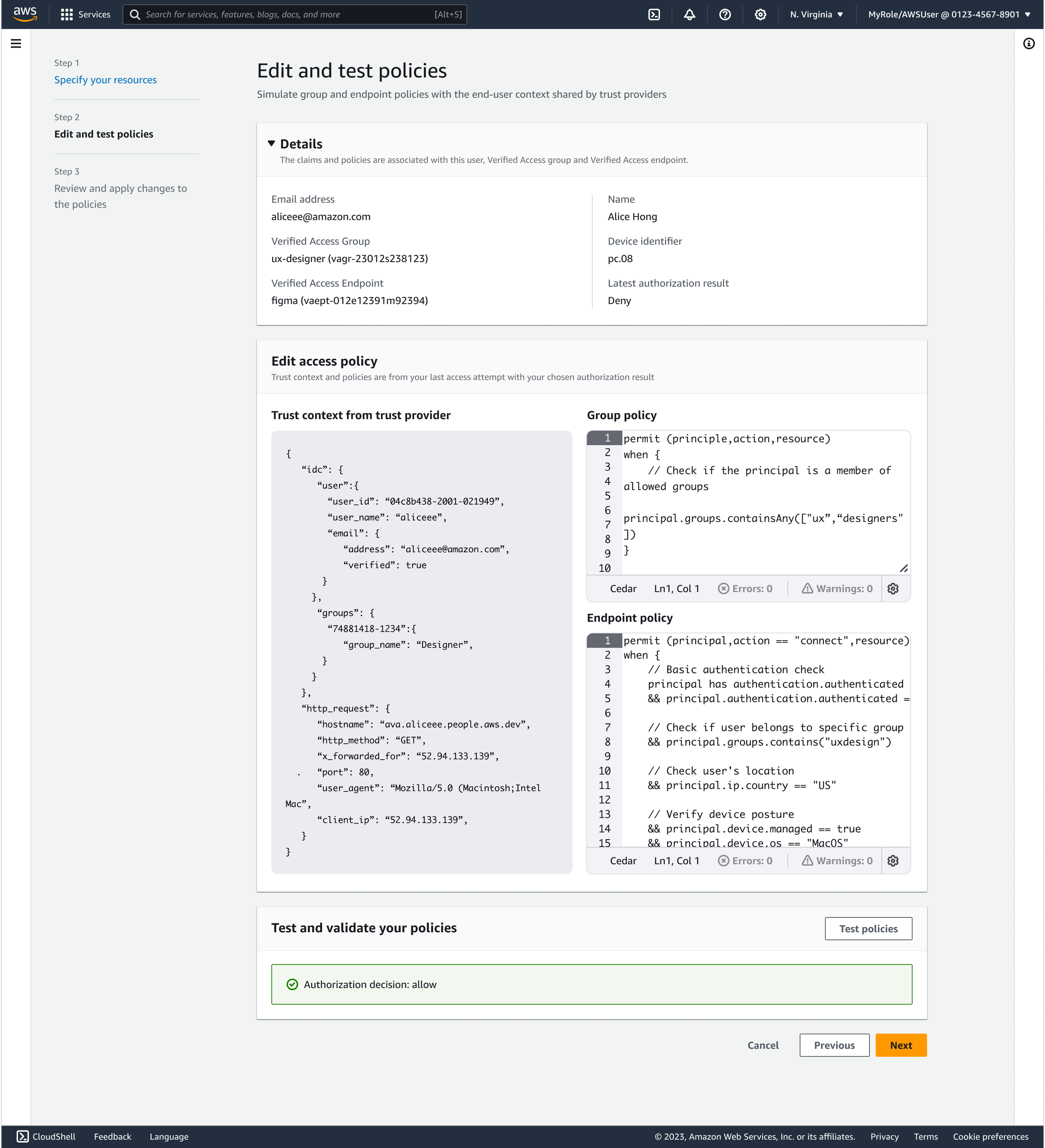
At this step, users have selected the Verified Access group and endpoint they want to work with. They can now do two key things:
Edit the group and endpoint policies
Validate those policies against real trust context from the selected provider
For example, an admin may want to confirm that members of the ‘designers’ group have access to Figma (the selected endpoint). They can test the policies to check whether the authorization decision returns “allow” as expected.
This view supports confident, in-context iteration — letting users adjust policy logic and immediately see how it affects access decisions..
Closer look: Review and apply step
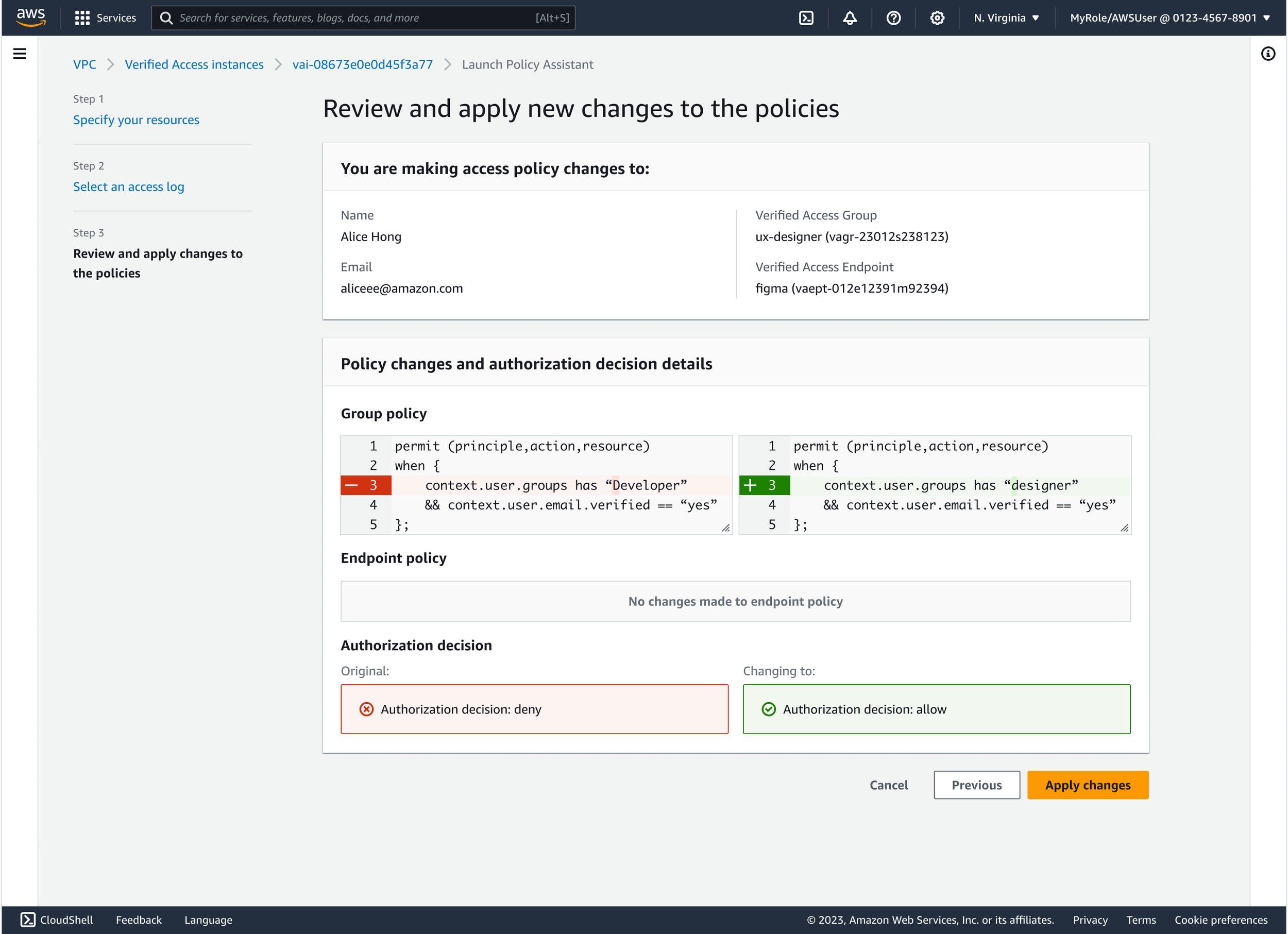
Since these policies determine who can access which applications across an organization, it’s critical that users feel confident before saving any updates.
To support safe validation, I designed a code diff view that clearly highlights what has changed in the group and endpoint policies. Below the diff, users can immediately see the authorization outcome (e.g., allow or deny) based on those changes.
This gives users the clarity they need to confirm updates — reducing risk and helping prevent unintended access issues.
Results
By enabling real-time policy simulation, the tool gave teams confidence in authoring secure, accurate rules based on user identity and device context — without pushing changes directly to production. This shift led to a noticeable reduction in policy-related support tickets, fewer misconfigurations, and less time spent on training or debugging access issues. Users could now retrieve live trust context, run simulations, and iteratively test and refine policies before deploying them.
Beyond usability, the assistant accelerated policy authoring workflows and gave teams greater visibility into Zero Trust policy logic — improving both developer efficiency and organizational security posture.