
Quote and Order Process for AWS Outposts
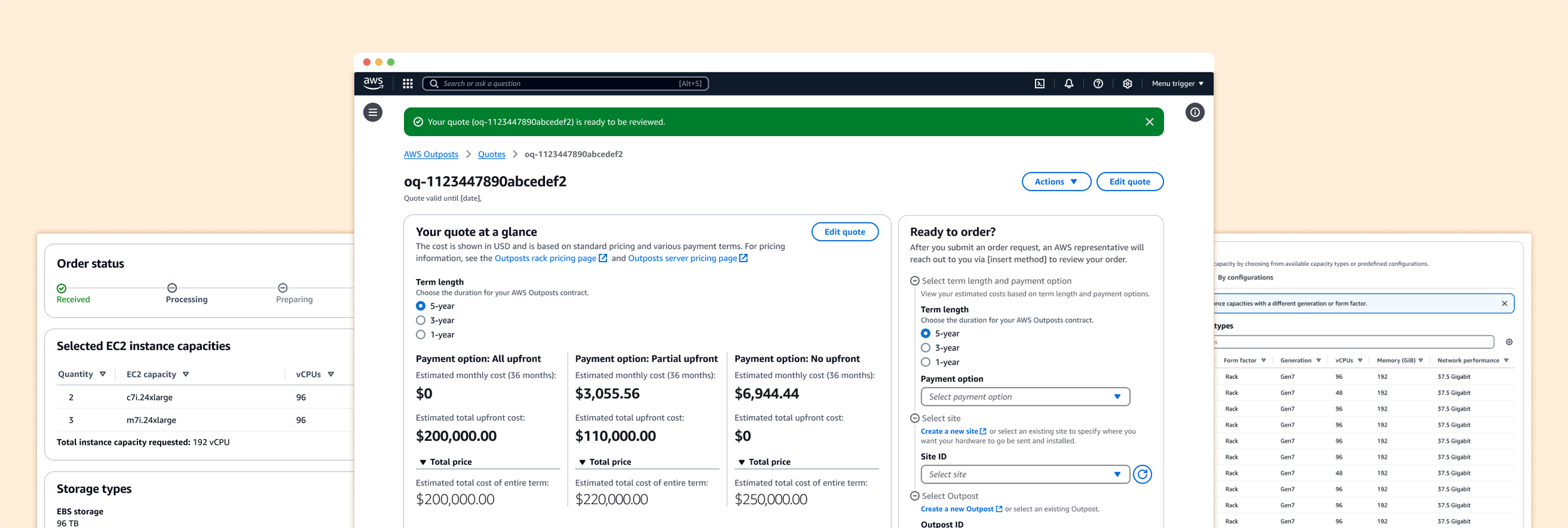
Introduced a quote-first workflow in AWS Outposts to simplify multi-stakeholder, async ordering and provide upfront pricing for high-cost hardware purchases.
Role: Lead UX Designer
Responsibilities: Led the UX design effort and worked closely with PMs, engineers, and customer support to understand workflow breakdowns and quote estimation constraints. I facilitated conversations around async handoff, user roles, and cost transparency, then designed an improved experience that allows teams to quote, plan, and order more collaboratively.
Duration: One year
Users & Audience:
Technical Leads – Know what needs to be ordered
Facility/Building Managers – Provide delivery, installation, and on-site info
Procurement/Finance – Need pricing to get approvals
Step 1 | Assess the current experience and its problems
Limited customization – Users couldn’t tailor their Outpost racks to specific performance needs.
When Outposts first launched, the original product team assumed customers would prefer predefined configurations—bundled combinations of commonly used instance types and storage. However, over time, it became clear that enterprise customers wanted greater flexibility to customize their Outpost racks to meet specific performance and workload needs.
To meet this demand, the team began creating custom SKUs for each enterprise configuration request. While this workaround allowed customers to select their desired setup in the AWS Console, it introduced significant friction and manual overhead for both the AWS team and the customer—slowing down the procurement process and creating scalability challenges.
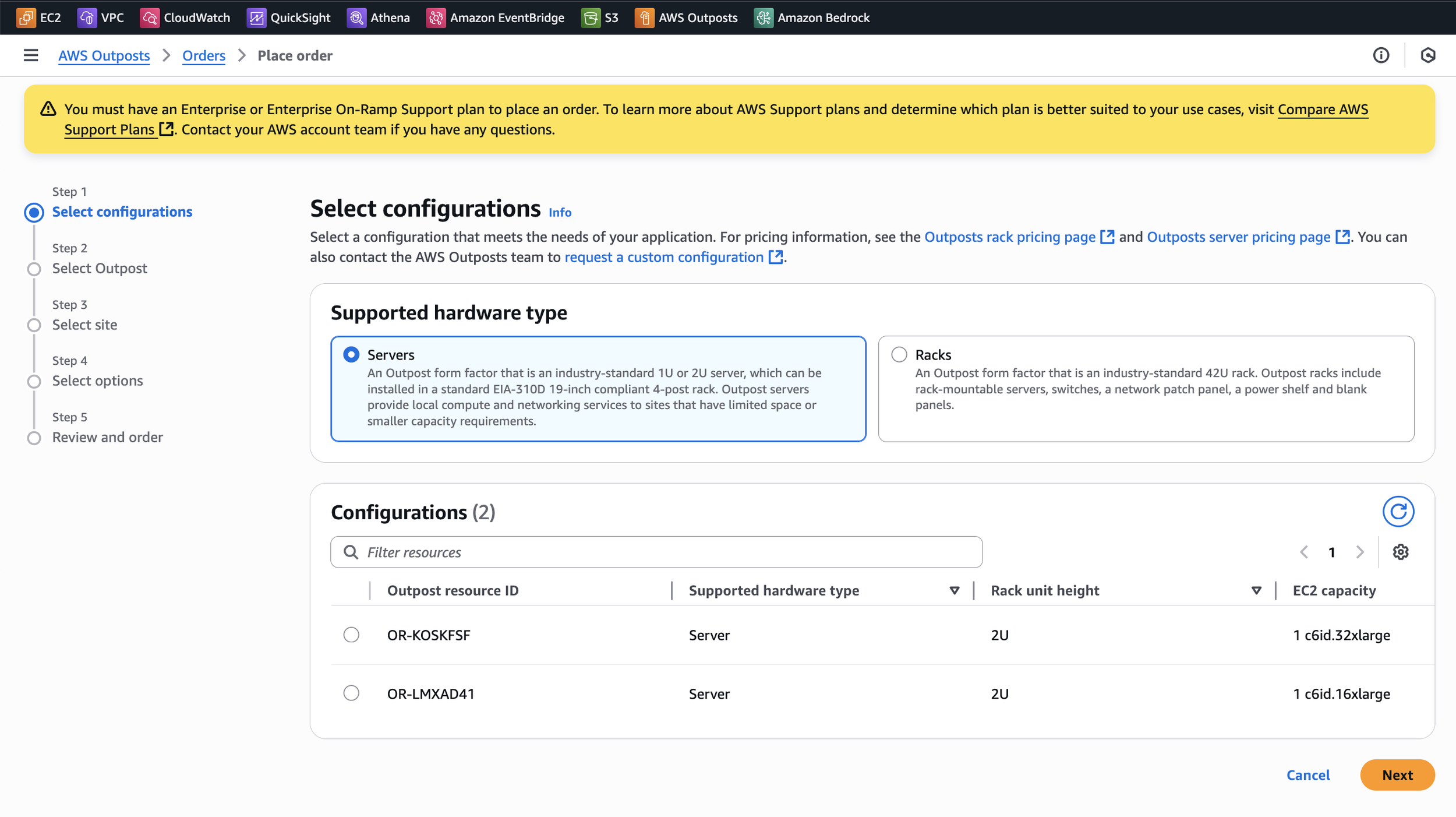
Unrealistic expectations of a single user – Different personas needed to input different parts of the form.
If users hadn’t already created an Outpost or a Site before starting the order process, they were required to do so within the wizard. However, we learned that these two steps typically involved different roles: someone with technical expertise (like a network engineer) would handle the Outpost setup, while a building or facilities manager would provide site details like shipping and installation info.
As a result, the person filling out the order form often had to pause and reach out to teammates for missing information. But doing so meant abandoning the form and losing all progress, leading to user frustration and increased drop-off.
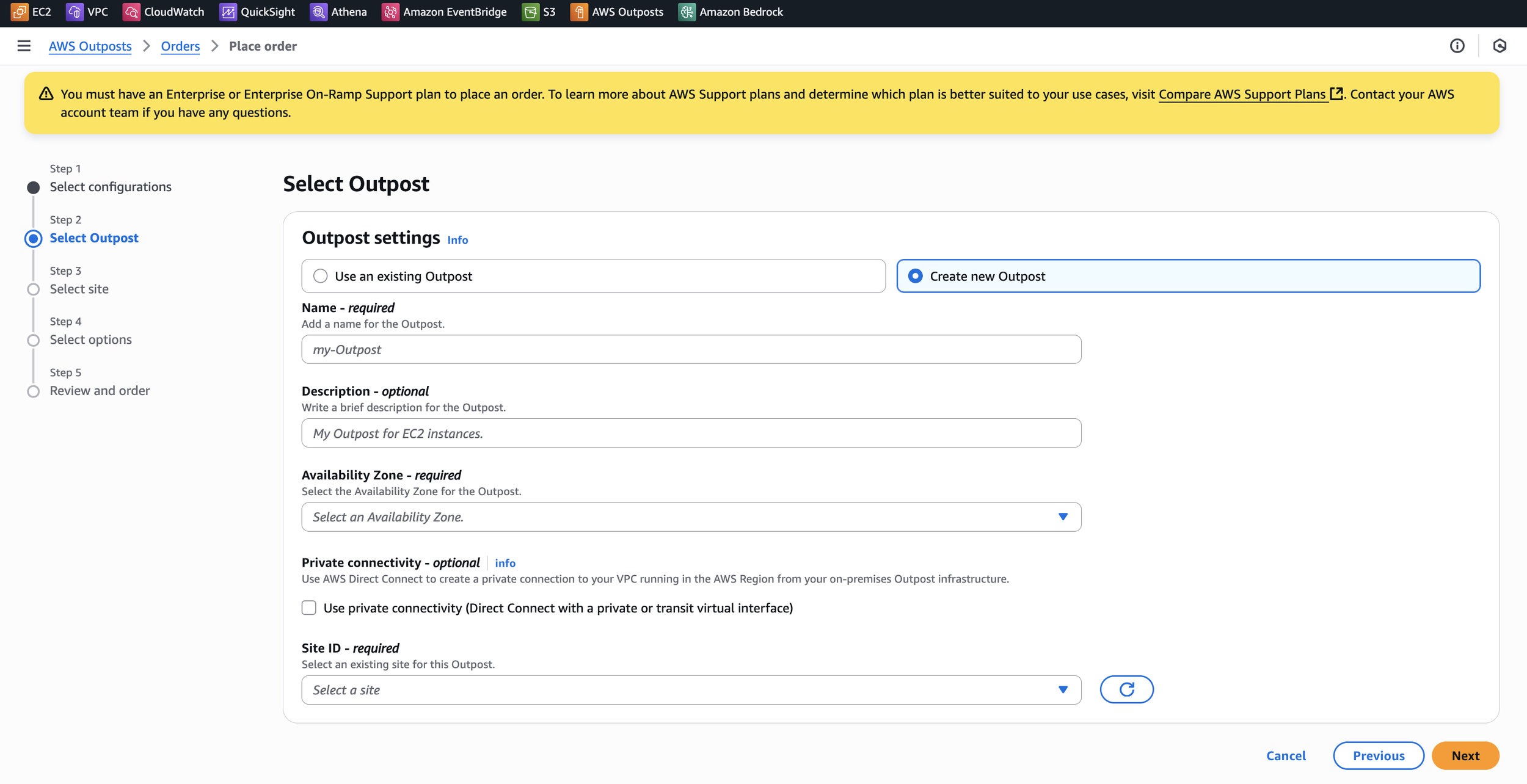
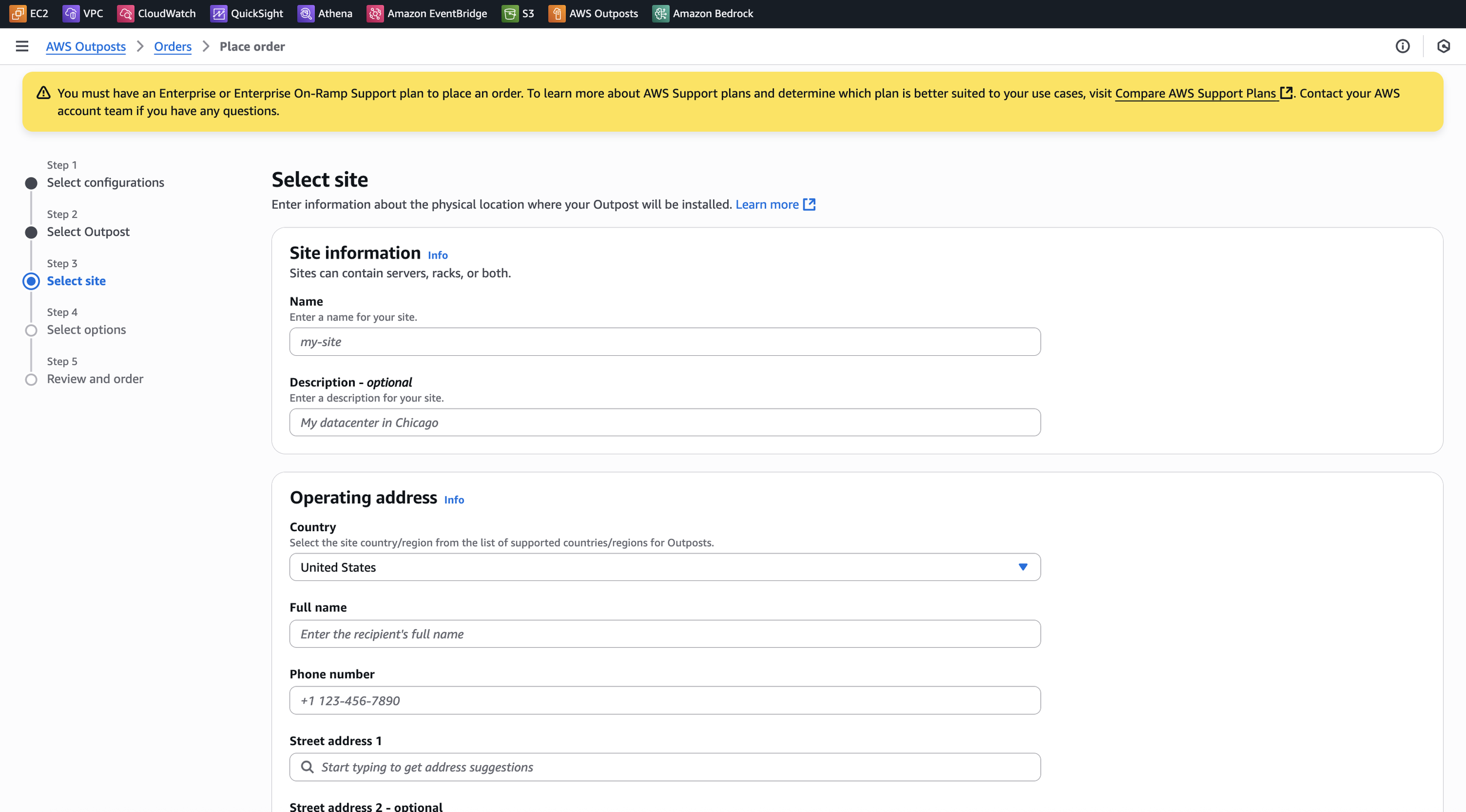
Lack of pricing transparency – Users couldn’t see the cost until after submitting everything.
Previously, there was no way for users to see pricing before submitting the full order form. Users had to fill out all shipment and configuration details, and only after clicking “Place Order” would an AWS account manager follow up to confirm and finalize the request.
This created a confusing and high-stakes experience—especially for purchases that could reach millions of dollars. Without upfront pricing, users couldn’t confidently evaluate the cost or get internal approval before starting the order. The lack of early visibility created friction, uncertainty, and often stalled the process.
Step 2 | Align across teams
There were areas I felt strongly about, based not only on direct customer feedback but also on supporting data—such as high bounce rates on the existing ordering process.
One key issue was the four-step wizard, which gave users the impression that the process would be long and complex—leading many to abandon the form before completing it. To address this, I focused on making the quote experience feel quick, simple, and approachable.
I worked closely with the product manager and API team to identify the minimum set of inputs needed to generate an accurate quote. This required several rounds of discussion and negotiation to strike a balance between backend constraints and a frictionless user experience—ensuring users could access pricing without feeling overwhelmed.

Through conversations with stakeholders, we were able to narrow the required inputs down to just three key fields: country, capacity types, and storage type. This was a major improvement from the 20+ fields in the original order form, and helped streamline the experience significantly.
I also successfully advocated for reworking parts of the API so we could deliver a precise, upfront quote—not just ranges or estimates. This allowed us to display an actual dollar amount upon quote completion, giving users the pricing clarity they needed to move forward confidently.
There were also important edge cases and legacy scenarios to consider. Since many existing customers still relied on older, predefined SKUs, we couldn't simply remove them. I worked with the team to ensure we maintained support for those configurations while laying the groundwork for a gradual transition away from custom SKUs—balancing future scalability with backward compatibility.
Step 3 | Design
My goal was to design a quote and ordering experience that felt fast, collaborative, and aligned with real user workflows. Specifically, I focused on:
Minimizing friction by reducing the form to just the essential inputs needed for an accurate quote
Making quotes easily shareable across teams involved in the decision-making process
Supporting asynchronous workflows so different personas could return to the quote later to complete the Outpost and Site setup
Maintaining flexibility for customers who still rely on custom SKUs
Improving conversion by reducing perceived complexity and making the process less cumbersome from start to finish
Scenario:
Get quote for new Outpost
To generate a quote for a new Outpost, users simply provide a few key inputs:
Country where the Outpost will be deployed
Desired capacity types (compute instances)
Preferred storage type
If they already have site details, they can optionally enter them at this stage.
As users add capacity types, a summary panel on the right updates in real time—similar to a shopping cart. It shows what’s been selected and allows quick edits, making it easy to explore different configurations.
The panel also provides helpful context, including total vCPUs and total physical weight of the rack. This helps users ensure their selections meet both their workload needs and physical site constraints before moving forward.
Scenario:
Get quote for existing Outpost
If users are generating a quote for an existing Outpost, we streamline the experience by narrowing their choices to only those compatible with the selected Outpost.
For example, if a user selects an Outpost that supports Generation 7 capacity types, the capacity table will automatically filter to show only Generation 7-compatible options—reducing confusion and the chance of misconfiguration.
Just like the new Outpost quote flow, users will still need to select their desired capacity types and storage options. However, the country and site information is preloaded based on the selected Outpost ID—making the process faster and more seamless.
Scenario:
Get quote for custom SKUs
Users can also choose to order by predefined configurations, just like in the original experience. This supports cases where customers already know the SKU they want or are reordering something familiar.
Closer look:
Quote details page
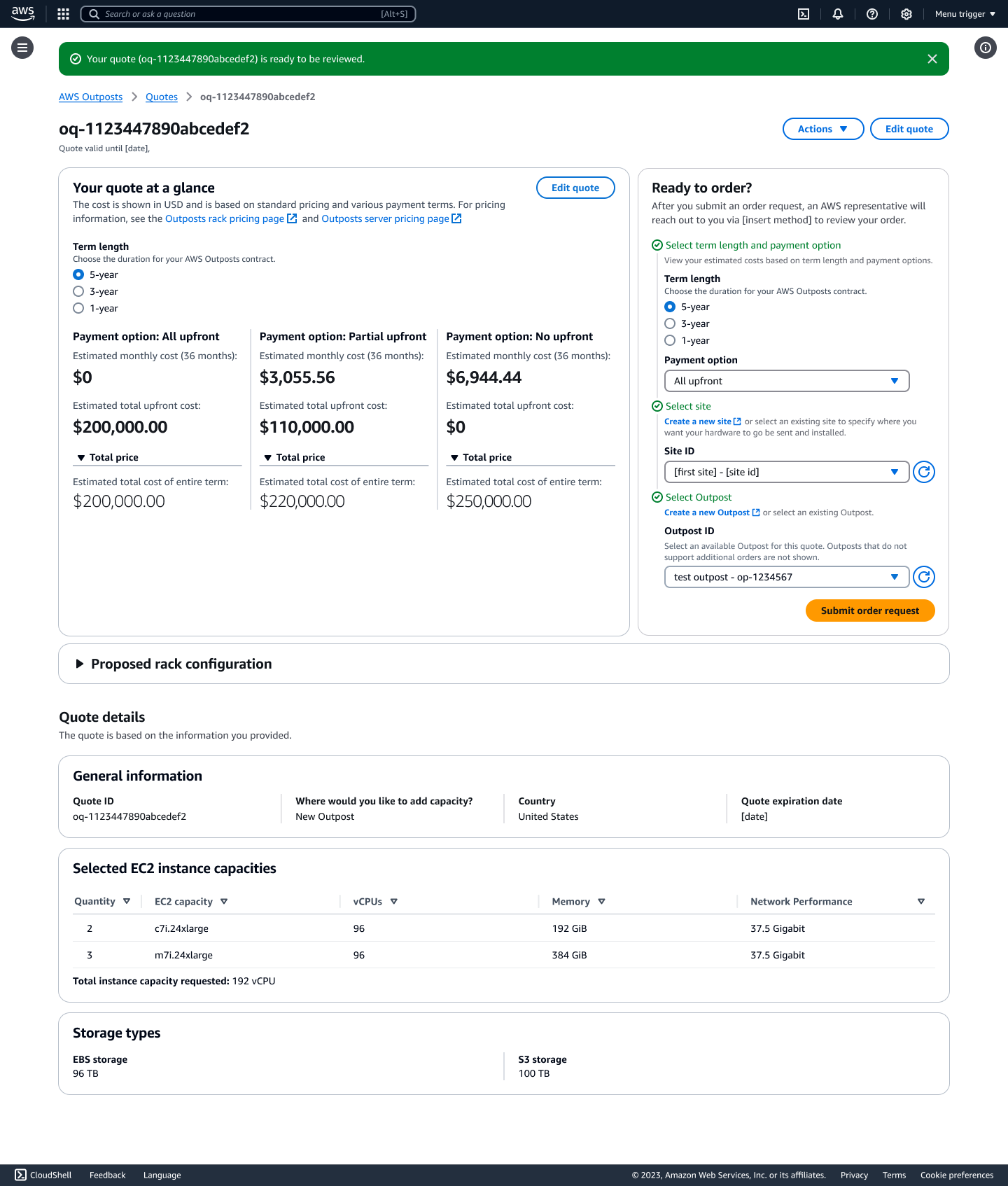
After completing the Get Quote form, users are taken to a Quote Details page where they can:
Try different payment term lengths to view estimated pricing based on various financing options
Select an existing Outpost and Site, or create them if they haven’t already
Review their proposed rack configuration, including capacity and storage selections
Confirm all quote details before moving forward
Export the quote as a PDF to easily share with teammates who may not have AWS Console access
This page was designed to support collaboration and internal alignment—critical steps in high-cost, multi-stakeholder purchase decisions.
Step 4 | Design for edge cases
User lacks permission to place an order
If a user doesn’t have the necessary permissions, the right-side order summary panel is hidden. Instead, we surface a clear message explaining their limited access. However, they can still export the quote as a PDF to share with others on their team who do have ordering privileges.
Site selected but missing required information
If a user selects a site that’s missing critical details (like shipping or contact info), they receive an inline error message with a direct link to edit the site. Once the required information is added and the page is refreshed, the user can proceed with their order.
If a user updates their quote (e.g., changes capacity or term length), we inform them that their estimated pricing may change. This helps set expectations and avoids confusion around quote accuracy.
Editing a quote
Site vs. Outpost selection
Because an Outpost cannot exist without a Site (but a Site can exist independently), selecting an Outpost first will automatically preload the associated Site. This reduces redundant work and keeps the experience intuitive.
Results and learnings
As this is a newly released feature, it’s currently only available to a limited set of users—so we don’t yet have statistically significant metrics to report. However, early feedback has been promising.
By decoupling quoting from ordering and introducing asynchronous workflows, we helped reduce drop-off in the ordering process and enabled teams to plan high-cost purchases more effectively. Initial user feedback highlighted:
Increased confidence in pricing before placing an order
A smoother handoff between technical and non-technical stakeholders
Greater flexibility in completing the order process over time
This project reinforced the value of designing enterprise tools that reflect how real teams operate—especially for complex, collaborative decisions involving millions of dollars.
In terms of learnings, I’ve learned:
Designing for enterprise collaboration means designing for handoffs.
I learned that high-stakes infrastructure workflows often involve multiple personas working asynchronously. Supporting flexible, save-and-return patterns wasn’t just a convenience—it was critical for adoption.
Design can drive backend alignment.
My early mockups helped uncover logic gaps and sparked important conversations across API, pricing, and ordering teams. I saw how design can influence system design when introduced early and framed around user needs.
Advocating for real users means sometimes pushing back on business pressure.
There was pressure to retire custom SKUs quickly, but I pushed to maintain support for existing customers who still relied on them. This helped the team avoid alienating long-time enterprise users.